 LT HORVÁTH
Semantic Searches Against Codebase
A local model and a vector database walk into a bar and the bartender asks, “How do we construct the authorization rules for an admin user?”.
In the past month, I was experimenting with setting up a local LLM workflow, which for now is quite a bust , but there was one tool that I kept and am still using. It accepts questions like the one above, and it will provide a list of code positions that are relevant to the question.
This tool is called grepai, which you would assume is pronounced like “grep AI”, but since it is not written like that, it must be pronounced “gre-pai” (Arigato, senpai).
It can build a local vector database with the help of an embedding model, both can be local, and I do indeed keep them local. There would be good reasons to build a shared database for multiple codebases, but for now, I set it up per project. (I mean, I did build a shared one once, it took 3 hours to build and I never used it…).
This vector database will be queried by a CLI tool that you invoke with the following command in your interactive terminal session: grepai. Huge surprise!
But before you use it, it needs some setup. The local model can be run with ollama, so install it however you want, I’m not your mother. Same goes for grepai itself.
grepai init
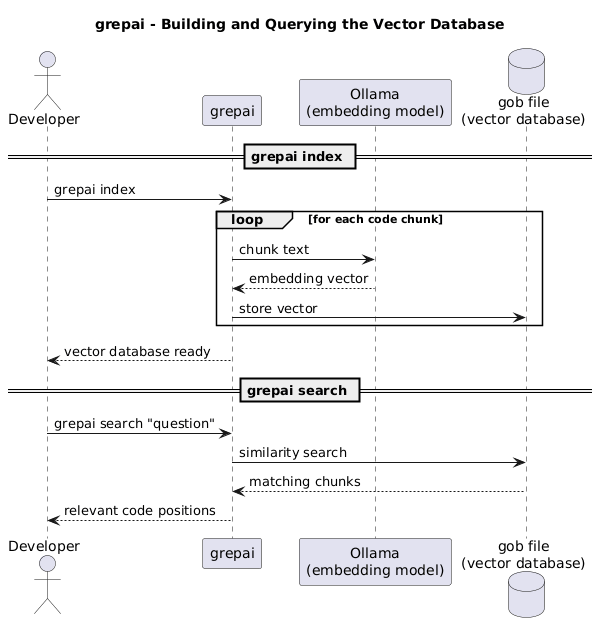
Running this command in your current path (which should be your project root) will ask you for an embedding provider (a.k.a., the tool running the model) and a storage backend (a.k.a., the vector database). I use ollama and gob, which stores the database in a local file.
grepai watch
This command builds the database and keeps it up to date with changes in the codebase. If you want the database to stay current, this process needs to be running.
grepai search 'where do we define the authorization rules for an admin user?'
grepai trace callers 'Login'
grepai trace callees 'Login'
And voilà, we can use these commands to search our codebase, and trace the callers and callees of a function.
At this point you could ask, “This is fine, but it does not feel like it is for me.” And you’re right! Stand aside, puny human, and let the robots do the work. Yes, this tool is quite useful for agents. There are multiple ways that grepai provides support for agents, most notably a dedicated skill and an MCP server. I personally use the skill, which details the usage of grepai and can be called with /deep-explore. The main thing is that you have to find a way to make the agent use the tool for code exploration.
I started using grepai because when the agent uses grep or rg, this would use more tokens, whereas a semantic search possibly provides the correct answer in fewer calls. Although this claim seems logical, I have no evidence to support it. I use it because code discovery is faster with it.
Thank you for participating in this heroic hipster tale of a local LLM workflow, and I hope you find it useful!